
How AI turns a photo into a video
Image-to-video AI takes one still photo and turns it into a short clip. The photo already fixes the composition, subject, lighting, and style, so the prompt does not need to rebuild the scene.
That changes how you should write. Unlike text-to-video, the prompt only needs to say how things move. The #1 beginner mistake is writing a vague vibe, like asking the subject to feel alive, instead of naming a concrete action. That often leads to stiff or uncanny motion.
- Name one clear action, or a short beat sequence.
- Add one camera move; a slow push-in is the safe default.
- Keep the motion concrete instead of describing a mood.
- Do not over-explain what the photo already shows.
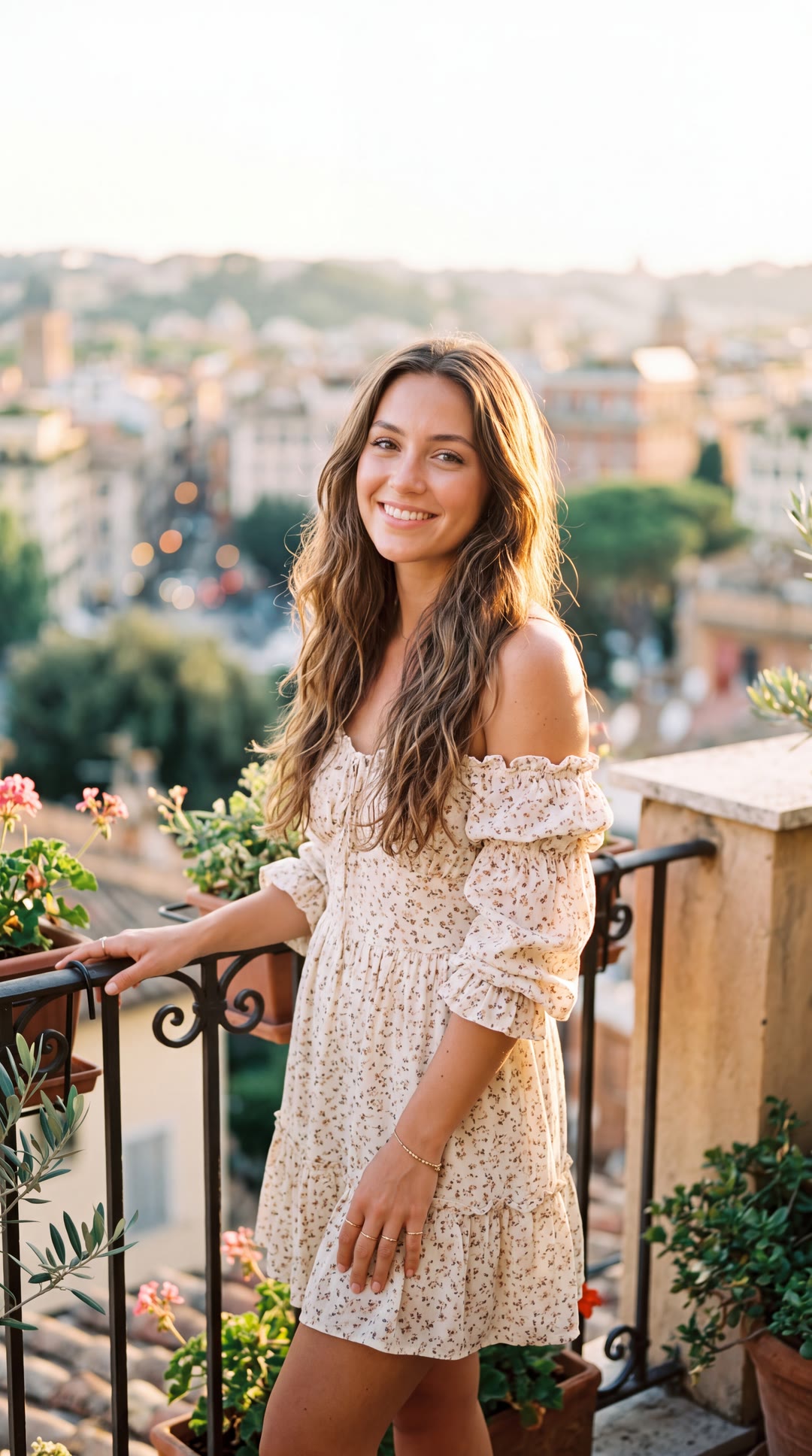
The single input photo we animated in every test.
The test: one photo, one action, four engines
We used one portrait and one action across four engines available in Vynzo: Kling 2.6, Seedance 2.0, Google Veo 3.1, and WAN 2.7. The action was a smile, blink, kiss blown to camera, warm laugh, and hair moving in a light breeze.
We ran three rounds: a plain user prompt, then a prompt tuned per engine, then targeted fixes. Running everything from one studio let us compare the exact same photo side by side.
The exact prompts are shown with each clip below, along with our notes, so you can copy them instead of guessing from the summary.
Round 1 — the plain prompt most people type
This round tests what happens when you type one plain line, leave the default settings on, and ask four engines to animate a photo without extra direction.
Kling won the naive round. Seedance went slow-motion, Veo had the best hair but a creepy one-eye blink, and WAN went plasticky and hallucinated rose petals.
The exact prompt — identical on all four engines
she smiles, winks and blows a kiss to the camera, her hair blowing in the wind
Winner of the plain-prompt round. Identity kept, and it did everything asked — except it skipped the blink.
Solid: identity intact and every beat executed — but the whole clip rendered in slow motion.
The most natural hair of the group and identity held — but a creepy one-eye blink, and she shook her head a lot on the kiss.
Recognizable, but the skin went plasticky, the blink became a face scrunch, the breeze looked storm-strength — and it hallucinated rose petals flying off her palm.
Round 1 — the same plain prompt on all four engines.
Round 2 — a prompt tuned to each engine
In Round 2, we rewrote the prompt for each engine. The counter-intuitive lesson was clear: more detail is not always better.
Kling got worse with a heavily scripted prompt and kissed its own palm instead of the camera. Seedance was the opposite: timed beats made it the best result of the whole test.
Veo stayed strong, while WAN improved but still looked waxy up close. The takeaway is that the best engine depends on how you prompt: Kling wants short, natural prompts, while Seedance rewards precise timed detail.
Regressed hard. Abrupt expression changes, the wink failed — and she kissed her own palm and stared at it instead of blowing the kiss to camera.
Prompt we used
She forms a soft smile, then gives one clear, natural blink followed by a playful wink; she raises one hand to her lips and blows a kiss, opening her palm toward the camera — fingers natural and intact, nothing leaves her hand; she finishes with a warm little laugh and a slight head tilt. Her hair drifts in a gentle breeze. Camera holds with a slow, subtle push-in. Keep her face and identity exactly as in the photo; natural real-time motion, no warping.
The best result of the whole test. Timed beats fixed the slow motion; expression natural, identity intact. Only flaw: the wink was almost too fast to see.
Prompt we used
Real-time natural pacing — NOT slow motion. [0-2s] she forms a soft smile. [2-4s] one clear, natural blink, then a playful wink. [4-7s] she raises a hand to her lips and blows a kiss, opening her palm toward the camera; fingers natural and intact, nothing leaves her hand. [7-10s] a warm laugh and a slight head tilt. A gentle breeze moves her hair throughout. Camera: slow, smooth push-in. Keep her identity and lighting consistent; stable, physically natural motion; no slow motion, no warping.
Close. Identity, naturalism and prompt-following all in place — but the wink still looked off and the face scrunched again. A few re-rolls would likely land it.
Prompt we used
Medium close-up, image-to-video from the still. She forms a soft, genuine smile, then gives one calm, natural blink with both eyes closing and opening together — not a squint, no facial scrunching — followed by a single playful wink. She raises one hand to her lips and gently blows a kiss, opening her palm toward the camera; fingers relaxed and intact, nothing leaves her hand. She keeps her head steady — only her hand, lips and eyes move, no head shaking. Hair drifts softly in a light breeze. Camera: static with a very slow push-in. Warm natural daylight, photorealistic skin. Audio: soft ambient breeze, no dialogue, no music. Keep her face and identity as in the photo.
Better than Round 1, but still waxy. The wink turned into a cringe scrunch, and the close push-in made her skin read as aged wrinkles.
Prompt we used
Use the photo as the first frame and identity anchor; keep her face and skin exactly as in the photo, photorealistic skin texture (not plastic or waxy). She forms a soft smile, gives one clean, natural eye blink — eyelids gently close and open, do NOT scrunch or wrinkle the face — then a playful wink; she raises a hand to her lips and blows a kiss, opening her palm toward the camera (fingers intact, nothing leaves it); ends with a small warm laugh. Only a light, gentle breeze moves her hair. Camera: slow, subtle push-in. Real-time natural motion. Negative: plastic skin, waxy texture, face wrinkling, grimace, strong wind, rose petals, falling petals, extra fingers, morphing.
Round 2 — a different prompt tuned to each engine.
Round 3 — targeted fixes
Only two engines still needed work, so we changed one thing each. For Kling, we tried a cleaner, shorter script with the wink dropped, and it still came out much worse than the plain one-liner from Round 1.
The honest conclusion is that with Kling, you should not engineer the prompt at all; one plain sentence wins. For WAN, a medium shot plus a negative prompt finally made it satisfactory: noticeably less plastic, fairly natural motion, and still slightly synthetic up close. Fix one variable at a time, and remember that sometimes the fix is less prompt, not more.
The surprise of the test: even this cleaner, shorter script came out much worse than the plain one-liner from Round 1. With Kling, the simplest natural phrasing wins.
Prompt we used
She smiles warmly, gives one clear natural blink, then raises a hand to her lips and blows a kiss toward the camera while looking straight at the lens; she finishes with a soft laugh. Her hair drifts in a gentle breeze. Slow, subtle push-in. Keep her face and identity as in the photo; natural motion.
Satisfactory at last. Noticeably less plastic with the negative prompt, no wink, and fairly natural motion — though up close it still reads slightly synthetic.
Prompt we used
Use the photo as the first frame and identity anchor; keep her face and youthful, smooth skin exactly as in the photo. She smiles warmly, gives one clean natural eye blink (no squint, do not wrinkle or scrunch the face), then raises a hand to her lips and blows a kiss toward the camera while looking at the lens; fingers intact, nothing leaves her hand; ends with a small warm laugh. Only a light breeze moves her hair. Camera: hold a steady MEDIUM distance — do NOT push in close, no close-up. Photorealistic smooth young skin. Negative: plastic skin, waxy texture, wrinkles, aged skin, face scrunching, strong wind, petals, extra fingers, close-up.
Round 3 — one targeted change each for the two weakest results.
The hardest part: winks
One detail broke on every engine in the first rounds: the wink. Kling skipped it, Seedance made it too fast to see, and Veo and WAN turned it into a cringe face scrunch.
Asymmetric single-eye motion is one of the hardest micro-expressions for current models. Use a clean two-eye blink plus a smile instead, or expect to re-roll. Dropping the wink helped WAN reach a satisfactory clip in Round 3, though for Kling even that could not beat the plain prompt.
Which engine animates a photo best?
There is no single best engine for every ai photo animation. Seedance 2.0 was the most natural once tuned, Kling 2.6 was the most reliable on a simple prompt, Veo 3.1 had the best hair and physics plus native audio but was the priciest, and WAN 2.7 held identity but looked the most synthetic on a close portrait.
The scorecard that follows keeps those trade-offs separate, so you can choose based on what matters most: natural motion, simple prompting, hair and physics, audio, identity, or close-up realism.
- Identity
- Excellent
- Action
- Best on simple prompts
- Realism
- Natural
- Motion
- Smooth
- Speed
- Fast
- Cost
- Mid
- Content flexibility
- Standard policy
- Best for
- Quick, reliable portrait animation
- Identity
- Excellent
- Action
- Best with timed beats
- Realism
- Very natural
- Motion
- Cinematic
- Speed
- Slower
- Cost
- Mid
- Content flexibility
- More permissive
- Best for
- Polished results when you script the beats
- Identity
- Strong
- Action
- Good
- Realism
- Great hair/physics
- Motion
- Natural
- Speed
- Fast
- Cost
- Highest
- Content flexibility
- Strict filtering
- Best for
- Realistic motion + native audio
- Identity
- Good
- Action
- OK after tuning
- Realism
- Slightly synthetic
- Motion
- OK
- Speed
- Medium
- Cost
- Low
- Content flexibility
- Open-weight, self-hostable → fewest restrictions
- Best for
- Wider shots, multi-reference, self-hosting
Try all four engines on your own photo — one studio.
Open the studioThe reliable workflow (works on any engine)
This is the workflow behind our best results for making a natural clip on the first try.
Start from one clear action, add one simple camera move, test the plain version first, then tune only what actually breaks. The ordered steps that follow turn that process into a repeatable image to video AI workflow.
- 1Pick a clear photo — one subject, good light, the face fully in frame; leave room for any hand gesture.
- 2Write the motion, not the scene: name one concrete action (a smile, a blink, blowing a kiss) and one camera move.
- 3Match the prompt to the engine: keep it short for Kling; add timed beats ([0-3s]…) for Seedance.
- 4Generate a short clip first, and keep the motion subtle so the face stays stable.
- 5If the face warps or an expression looks off, cut the number of actions — over-motion is the #1 cause of warping.
- 6Export vertical (9:16) for TikTok, Reels and Shorts.