
What we made, in numbers
We made a 2-minute animated music video for an original track, with Ava and Jordan recurring from start to finish. The full production ran for 7 calendar days, from 10-16 August 2026.
The funnel was the real story. We produced 205 generations, got 20 minutes of footage, and kept 1 minute 58 seconds in the final edit, which worked out to roughly a 10:1 ratio.
That ratio, not the quality of any one clip, was what people underestimate when they make a music video with AI. A good AI music video generator can give strong clips, but the finished video still came from selection, timing, reuse, and cuts.
| Stage | Result |
|---|---|
| Video generations run | 205 |
| Completed successfully | 203 |
| Footage generated | 20 min 10 s |
| Clips kept after review | 152 |
| Clips used in the final cut | ~90 |
| Shots in the final cut | 142 |
| Final runtime | 1 min 58 s |
| Calendar time | 7 days |
Frames, motion and lip sync for your own music video — in one studio.
Open the studioThe look came first: concept art, then frames
We did not animate anything until the look existed as still images. Concept art fixed the palette, wardrobe, and both faces before we moved into shot production.
After that, every shot got its own starting frame generated in Nano Banana 2 from the concept art. A portion of those frames were refined afterward in an image editor, and the project used 151 frames total.
This order mattered because image-to-video inherited composition, lighting, and character from the still. A weak frame could not be rescued by a good motion prompt.
We also gave the characters names, Ava and Jordan, and used those names in the prompts. Twenty-two prompts referred to them by name, and that carried identity better than re-describing hair and clothes every time; it became one of our clearest character consistency AI video lessons.
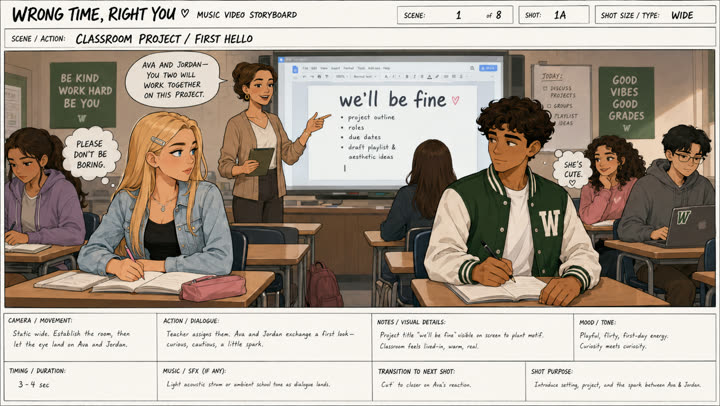
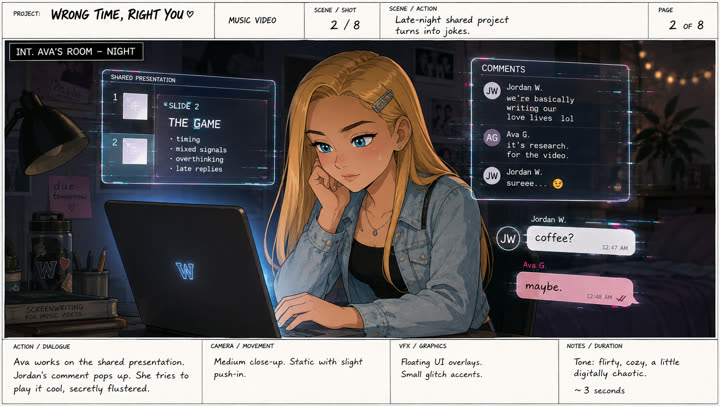
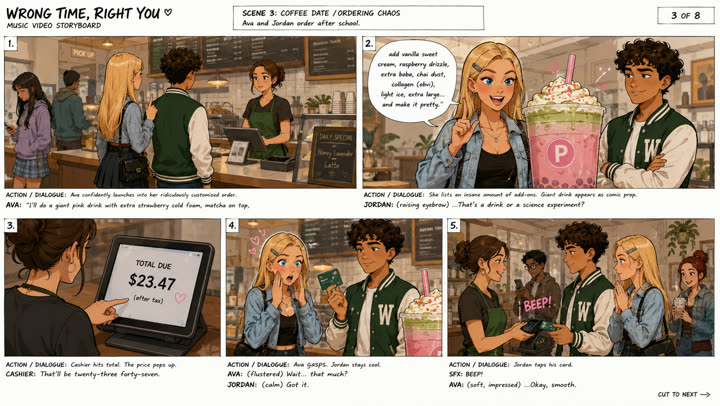
Concept art, made before a single shot was animated. It fixed the palette, the wardrobe and both faces — everything downstream had something to match.
What it took: engines, settings and credits
For video generation, 204 of 205 runs used Seedance 2.0 image-to-video at 1080p. Within that work, 155 were 5-second clips at 15 credits each, and 35 were 10-second clips at 30 credits each.
The average render took 94 seconds, the longest took 19 minutes, and the project used 5.3 hours of machine time in total. For the video ledger, the number was exact: 3,613 credits charged, 30 refunded for two failed runs, and 3,583 net credits.
The full project came to roughly 4,500 credits, but the two halves came from different sources. The video number was measured from the account ledger; the frames and lip sync were priced from the public rate card because those tools were not billed on the account we used.
Nano Banana 2 images cost 2 credits from a prompt or 4 through the editor, and ours were a mix of both, so 151 frames came to about 453 credits. Kling 2.6 lip sync billed 2 credits per second of audio: the 27 lip-synced clips we kept measured 209 billed seconds, which came to 402 credits, while all 33 lip-sync runs worked out to roughly 491 credits.
Frames
- Engine
- Nano Banana 2
- Runs
- 151 images
- Settings
- Text-to-image and editor passes off the concept art
- Credits
- ~453
Motion
- Engine
- Seedance 2.0
- Runs
- 204 generations
- Settings
- 5 s and 10 s at 1080p, image-to-video
- Credits
- 3,608
One shot
- Engine
- Kling 2.6
- Runs
- 1 generation
- Settings
- 5 s, first frame + last frame
- Credits
- 5
Lip sync
- Engine
- Kling 2.6
- Runs
- 33 runs, 27 kept
- Settings
- 2 credits per second of audio
- Credits
- ~491
Music
- Engine
- Suno
- Runs
- 1 track
- Settings
- 2 min 37 s, trimmed to 1:58
- Credits
- separate subscription
Total
- Engine
- —
- Runs
- —
- Settings
- Video measured; frames and lip sync at list price
- Credits
- ≈ 4,500
Hard part one: the emotion you asked for vs the one you get
This was the single most repeated fight. When we asked for a chorus performance, the model kept drifting toward its default: wide-eyed, sincere, and slightly sad, while we wanted cool, self-aware, and a bit amused.
Positive description alone did not move it enough. What helped was writing the expression as an arc inside one shot, so the face changed over time instead of holding one adjective for ten seconds; 26 of our prompts used that kind of arc.
The other fix was naming the unwanted default and banning it outright. We used phrases like "no deer eyes, no innocent wide-eyed expression, no ballad sadness," and 19 prompts carried a ban like it; when a model had a strong prior, a negative was a stronger instrument than an adjective.
Two things are doing the work here. The expression is written as an arc inside a single shot — playful first, sincere by the end — rather than as one adjective held for ten seconds. And the last line reserves the mouth: motion stays relaxed because lip sync is applied later. The companion take went further and banned the default outright ("no deer eyes, no innocent wide-eyed expression, no ballad sadness"), which is what finally moved the read.
Reveal the prompt
10-second 16:9 animated music-video shot. Preserve the exact girl, face, bright blue eyes, long straight blonde hair, silver hair clip, denim jacket, black top, proportions and illustrated visual style from the reference image. She performs the chorus while sitting at her school desk, looking directly toward camera. Start playful and self-confident: soft knowing smile, slightly raised eyebrow. Then her expression gradually becomes more sincere and vulnerable, like she suddenly means the words more than she expected. Small head tilts, subtle shoulder rhythm, fingers lightly tapping the desk to the beat. Gentle hair movement. Slow cinematic push-in from medium shot to medium close-up. Background students stay soft and secondary. Keep mouth movement subtle and relaxed for later lip sync. No exaggerated gestures, no camera shake, no text, no style change.
The fix for a wrong emotional read is a list of what NOT to do.
Hard part two: the same set from another angle
Once a location existed, returning to it for a second angle became one of the most expensive parts of the workflow. Rewriting the prompt often changed too much, so we got more value from re-rolling the identical prompt.
In total, 21 prompts were submitted more than once byte-for-byte, creating 29 extra generations. We also locked both ends of a move with a first frame and a last frame, which was what the single Kling 2.6 generation in the project was for.
Depth of field helped cover the remaining mismatch. Thirty-four prompts pushed the background soft and secondary, so a re-generated set did not need to match perfectly in every detail.
This exact prompt was submitted four times in one hour, unchanged. Nothing was wrong with the wording — the model simply had to be asked repeatedly before the boy approached from behind without the two of them merging. Re-rolls, not rewrites, carried 29 of our 205 generations.
Reveal the prompt
cinematic shot based on the reference image. The blonde girl stands beside the punch bowl, relaxed and confident, holding a plastic cup. She raises the cup and takes one large sip of the party punch. At the same time, the dark-haired boy quietly approaches her from behind, naturally closing the distance through the party crowd. Just as she finishes the sip, he gently places one hand on her shoulder to get her attention. She has not turned around yet. Background guests continue talking, drinking and moving naturally. Warm amber party lighting, subtle camera push-in, realistic body movement. Preserve both characters, outfits, room layout and anime-cinematic style. No sudden motion, no morphing, no extra limbs.
Two versions were generated 14 minutes apart: one where they kiss, one where they lean in and stop. Keeping both cost 60 credits and made the ending an editing decision rather than a generating one — which is the cheaper place to change your mind.
Reveal the prompt
Animate the provided image, preserving the exact faces, hairstyles, clothing and anime style of both characters. They stand very close, hold soft eye contact, slowly lean in but don't kiss. At the exact moment the camera begins a smooth cinematic 360° orbit around them, keeping their faces and upper bodies centered and sharp. The couple stays almost still with subtle breathing, blinking and slight hair movement. As the camera circles them, the entire party background gradually becomes heavily blurred with warm golden bokeh from candles and string lights, as if the world disappears around them. Shallow depth of field, natural parallax, warm amber rim light, romantic pacing, stable camera, high character consistency. Avoid face morphing, anatomy errors, camera shake, fast motion, focus loss, or characters rotating instead of the camera. /
Returning to a set you already generated is the most expensive thing in the whole workflow.
Lip sync goes on last
Our order was simple: generate the shot first, then apply lip sync in Kling 2.6, driven by the vocal from the finished track. We made 33 lip-synced clips that way.
The counter-intuitive part was the motion prompt. It had to keep mouth movement subtle and relaxed because the mouth got replaced later; 10 prompts said this explicitly, and shots with expressive mouth articulation fought the lip sync applied on top.
Note what the source prompt does NOT ask for: it keeps the motion subtle and the mouth relaxed, because the mouth gets replaced later. Lip sync goes on last, in Kling 2.6, driven by the vocal from the finished track. This shot ended up in the final cut four separate times.
Reveal the prompt
Animate this image into a subtle cinematic anime-style video. Preserve the blonde woman’s identity, face, blue eyes, freckles, hair, outfit, headphones, bedroom, lighting, colors, and composition. She lies on her stomach along the bed, hands gently supporting her face, looking into the camera and softly singing along to music in her headphones. Add natural lip-sync, small mouth and jaw movements, gentle blinking, slight eyebrow motion, soft breathing, head movements to the rhythm, and minimal hair motion. Keep her gaze mostly on the camera. Fairy lights softly flicker, candle flame moves naturally, neon heart glow subtly varies. Camera stays almost static with a very slow push-in. Keep motion smooth and restrained. No face changes, warped hands, extra fingers, body distortion, outfit changes, camera cuts, or exaggerated movement.
The part nobody talks about: the edit
The strongest lesson of the project was that generation skill without editing skill produced a showreel, not a music video. The track ran at 130 BPM, and the finished video had 142 shots in 118 seconds.
The median shot was 0.70 seconds, which matched a dotted quarter. Eighty-five shots were exactly 1.5 beats long, 31 were exactly 2 beats, and 117 of 141 cuts landed within half a frame of the half-beat grid.
The density also came from where the cuts went. Eighty of 141 cuts jumped to a different location, so the video cross-cut between school, cafe, bedroom, and party instead of playing each scene as a block.
We reused material on purpose: 82 source clips covered 123 shots, and some clips appeared up to four times. The tempo was also built into generation, not only the edit, with 19 prompts naming a BPM and 3 scripting choreography beat by beat; the two long holds around 77-84 seconds were the only breather, and they were deliberate.
The choreography is written as beats, at the same 130 BPM the track runs at: "Beats 1-2: dancers step outward. 3-4: pom-poms rise in alternating diagonals." Motion generated on the tempo grid cuts cleanly on the tempo grid — 19 of our prompts name a BPM for exactly this reason.
Reveal the prompt
High-angle wide shot. Keep exactly the same five Westfield cheerleaders, uniforms and gym. Animate geometric synchronized choreography at 130 BPM. Beats 1-2: dancers step outward, expanding the formation. 3-4: pom-poms rise in alternating diagonals. 5-6: two quick steps inward while everyone rotates about 45°. 7-8: formation opens into a star-like shape and hits a strong final pose. Maintain precise spacing and synchronization. Camera slowly cranes downward and pushes toward center court. Floor reflections and pom-pom highlights move naturally. No added dancers, morphing, character drift or costume changes.
Nine shots in six seconds, with sound. The median shot in this video is 0.70s — a dotted quarter at 130 BPM — and 117 of 141 cuts land within half a frame of the half-beat grid. This is what a face has to survive: 0.7 seconds at a time, 142 times.
Generate on the grid, cut on the grid.
What still breaks
Two failure modes still broke through. On long, near-static holds, the model could hallucinate extra figures, with a second person fading in out of nothing; lettering also degraded whenever the camera moved, so WESTFIELD on the cheer uniforms drifted into nonsense across a shot.
The practical mitigations were not glamorous, but they helped. We kept holds short, which the fast cut already did, kept readable text out of frame or out of focus, and re-rolled rather than rewrote when a clip was close.
Watch over her shoulder near the end: a second figure fades in out of nothing. Long holds on a near-static frame are where this shows up most, which is one more reason the edit runs short. Lettering fails the same way — the WESTFIELD on the cheer uniforms drifts into nonsense whenever the camera moves.
The workflow that worked
This was the sequence we would repeat, in order.
- 1Finish the track first. The edit is built on its tempo, so you need final audio before you generate a single shot.
- 2Design the look on paper. Concept art that fixes palette, wardrobe and both faces gives every later prompt something to match.
- 3Name your characters and use the names in every prompt — "Ava" and "Jordan" held identity across generations better than physical description alone.
- 4Generate one frame per shot in Nano Banana 2, working from the concept art rather than from scratch.
- 5Animate each frame in Seedance 2.0. Five seconds at 1080p is the workhorse; reach for ten only when the action genuinely needs it.
- 6Script motion in beats at the track tempo, so generated movement lands on the same grid the edit will use.
- 7Say what you do not want. Wrong emotional defaults are the most common reason a technically fine shot reads wrong.
- 8Add lip sync last, in Kling 2.6, and only on the shots that hold the camera on a face.
- 9Cut on the beat, and cross-cut between locations instead of playing each scene as a block.